In shortInstall Naver Map (네이버 지도), set it to English, and search in Hangul whenever an English name fails. Google Maps in Korea still offers places and public-transit routes but no turn-by-turn walking or driving directions, even after Korea conditionally approved Google's map-data request in February 2026.
Key facts
- Google Maps in Korea (October 2026)
- Places and transit routes; no walking or driving turn-by-turn
- Google map-data export
- Conditionally approved February 27, 2026; no launch date
- Naver Map languages
- Korean, English, Chinese, Japanese
- Kakao Map App Store languages
- English and Korean
- Best search input
- The Hangul name, e.g. 경복궁 (Gyeongbokgung)Naver Map
- To find the station
- Add 역 (yeok), e.g. 경복궁역
- Seoul bus colors
- Blue trunk, green branch/village, yellow circular, red express
Checked Oct 20, 2026 against the official sources listed at the end of this guide.
What Google Maps can and cannot do in Korea
Google Maps works in Korea as a directory: it shows places, reviews and public-transit routes. What it has never offered here is turn-by-turn walking or driving navigation, and the walking legs of its transit routes appear only as dotted lines. The reason is legal rather than technical. Korea restricts the export of its government survey map data on security grounds, and Google's requests to move 1:5,000-scale map data to its overseas servers were refused in 2007 and 2016.
That changed on paper on February 27, 2026, when an interagency review body approved Google's request with conditions: military and other sensitive sites blurred in imagery, coordinates for Korean territory restricted, raw data processed on domestic servers run by a local partner, and a dedicated map officer stationed in Korea. In August 2026 Google told The Korea Herald it plans full navigation in Korea, but it gave no launch date. Until walking directions actually appear in the app, plan your trip as if they will not.
Keep Google Maps for what it does well, such as browsing reviews in English and opening the saved lists you built at home. Do the on-the-ground navigation in a Korean app. Naver and Kakao route you along real footpaths, crossings and underpasses, they know the bus network stop by stop, and they tell you which subway exit to use. That last detail matters in a city where the straight line on a map often crosses an eight-lane boulevard with no crossing in sight.
Naver Map or Kakao Map: pick a main app
Both apps are free, Koreans split their loyalty between them, and either will get you there. For a first visit, make Naver Map (네이버 지도, Neibeo Jido) your main app. Naver says it supports Korean, English, Chinese and Japanese, following either your phone's language or a setting inside the app. It machine-translates business names, addresses, categories and opening hours, and since October 2024 it also translates written reviews through its Papago translator. The translations are rough in places, but they let you judge a restaurant without copying text into another app.
Setting the language takes one step. If your phone already runs in English, Naver Map follows it; if not, change the language in the app's own settings, which leaves your phone's system language alone. Much of the interface and place information then appears in English, while smaller businesses may still show Korean. Keep that split in mind: the menus speak English, but the data underneath is a Korean database, which is exactly why the Hangul name remains your most reliable search key.
Naver's transit guidance is the other reason to choose it. Since December 2023 it has followed you along a route with boarding and get-off alerts, a count of stops remaining, the train door closest to your transfer and the station exit number you need. On iPhones, where location tracking underground is limited, you select the train you boarded and the alerts follow that train. In practice this means you can ride with the phone in your pocket and still know when to stand up.
Kakao Map (카카오맵, Kakaomaep) is the strong second choice. Its App Store listing names English as a supported language alongside Korean, and its route search covers the same subway and bus network. Expect more untranslated Korean on its place pages than on Naver's. Install both before you fly: when one app's route looks odd, a second opinion takes ten seconds, and a backup app also covers you if one of them misbehaves on your phone.
Type the Hangul name and the right place comes up
English searches work for the biggest landmarks and break down quickly for anything smaller. Korean place databases are written in Hangul, while English names come in competing forms: an official translation (Gyeongbok Palace), the Revised Romanization of the Korean name (Gyeongbokgung) and older spellings that survive on signs and in guidebooks (Kyungbok, Kyongbok). Korea's current romanization rules, published by the National Institute of Korean Language, spell words as they are pronounced, which is why 국립 (national) becomes gungnip rather than guklip. A Hangul search sidesteps all of that; 경복궁 can only mean one thing.
Learn a handful of endings and you can read a result even when you cannot read the rest: 궁 (gung) is a palace, 사 (sa) a temple, 역 (yeok) a station, 시장 (sijang) a market, 박물관 (bangmulgwan) a museum and 마을 (maeul) a village. You do not need a Korean keyboard. Copy the Hangul from the table below, or from a venue's official website, and paste it into the search bar. If you plan to use Korean often, adding the Korean keyboard in your phone's settings takes a minute and costs nothing.
| Site | Type this | Romanization | Note |
|---|---|---|---|
| Gyeongbokgung Palace | 경복궁 | Gyeongbokgung | Address 사직로 161; nearest exit Gyeongbokgung Station Exit 5 |
| Changdeokgung Palace | 창덕궁 | Changdeokgung | Address 율곡로 99; nearest exit Anguk Station Exit 3 |
| Deoksugung Palace | 덕수궁 | Deoksugung | Address 세종대로 99; City Hall Station Exit 2 |
| Changgyeonggung Palace | 창경궁 | Changgyeonggung | Address 창경궁로 185; Hyehwa Station Exit 4 |
| Jongmyo Shrine | 종묘 | Jongmyo | Address 종로 157; Jongno 3-ga Station Exit 11 or 8 |
| National Museum of Korea | 국립중앙박물관 | Gungnip Jungang Bangmulgwan | In Yongsan-gu, south of the city center |
| National Folk Museum of Korea | 국립민속박물관 | Gungnip Minsok Bangmulgwan | Inside the Gyeongbokgung grounds; address 삼청로 37 |
| Bukchon Hanok Village | 북촌한옥마을 | Bukchon Hanok Maeul | A residential district; the pin is only a starting point |
| Jogyesa Temple | 조계사 | Jogyesa | Head temple of the Jogye Order, central Jongno |
| Namsangol Hanok Village | 남산골한옥마을 | Namsangol Hanok Maeul | Address 퇴계로34길 28, at the foot of Namsan |
Stations, gates and look-alike results
Add 역 (yeok) when you want the station rather than the sight: 경복궁역 (Gyeongbokgung-yeok) returns the Line 3 station, while 경복궁 returns the palace. For large sites, think about which gate you will use, because a palace like Gyeongbokgung covers so much ground that the default pin can sit far from your entrance; zoom in and set the destination on the gate itself. Chain restaurants and cafés produce dozens of identical names, so add the neighborhood, such as 인사동 (Insa-dong), after the business name, and read the district shown under each result before you tap Directions.
One more habit saves real time: check the result category before you navigate. A search for a palace can also return a parking lot, a ticket office, a nearby café that borrowed the name, or the station. The category label sits just under the name in both apps, and Naver shows it in English. Ten seconds of reading here prevents the classic mistake of walking confidently to a car park on the wrong side of the walls.
Copy the road-name address, not the English
Korean addresses run from large to small: city, district, road name, building number. Gyeongbokgung's official address is 서울 종로구 사직로 161, which reads as Seoul, Jongno-gu, Sajik-ro, number 161. Changdeokgung is 율곡로 99 (Yulgok-ro 99) in the same district, and Deoksugung is 세종대로 99 (Sejong-daero 99) in Jung-gu. Place pages show this road-name address (도로명, doromyeong) and often the older lot-number address (지번, jibeon) as well. Use the road-name version, which is what drivers and delivery riders expect.
Address words carry meaning once you know the suffixes. 구 (gu) is a district, such as Jongno-gu; 동 (dong) is a neighborhood, as in Insa-dong; 로 (ro) is a major road and 길 (gil) a smaller street, often numbered off a main road, as in Toegye-ro 34-gil, the lane that leads to Namsangol Hanok Village. 가 (ga) marks a numbered section of a long street, which is why the station called Jongno 3-ga sits on the third section of Jongno. Reading these lets you sanity-check a result: a palace pin in the wrong district is the wrong pin.
Copying the Hangul address is the most useful thing you can do before a taxi ride. Drivers type the destination into their navigation, and Hangul goes in cleanly where a romanized address invites typos and guesswork. Keep the addresses of your accommodation and of each day's first stop in a notes app, in Hangul, so you can show them even when the map app is slow to load or your battery is low.
Reading a transit result: exits, doors and bus colors
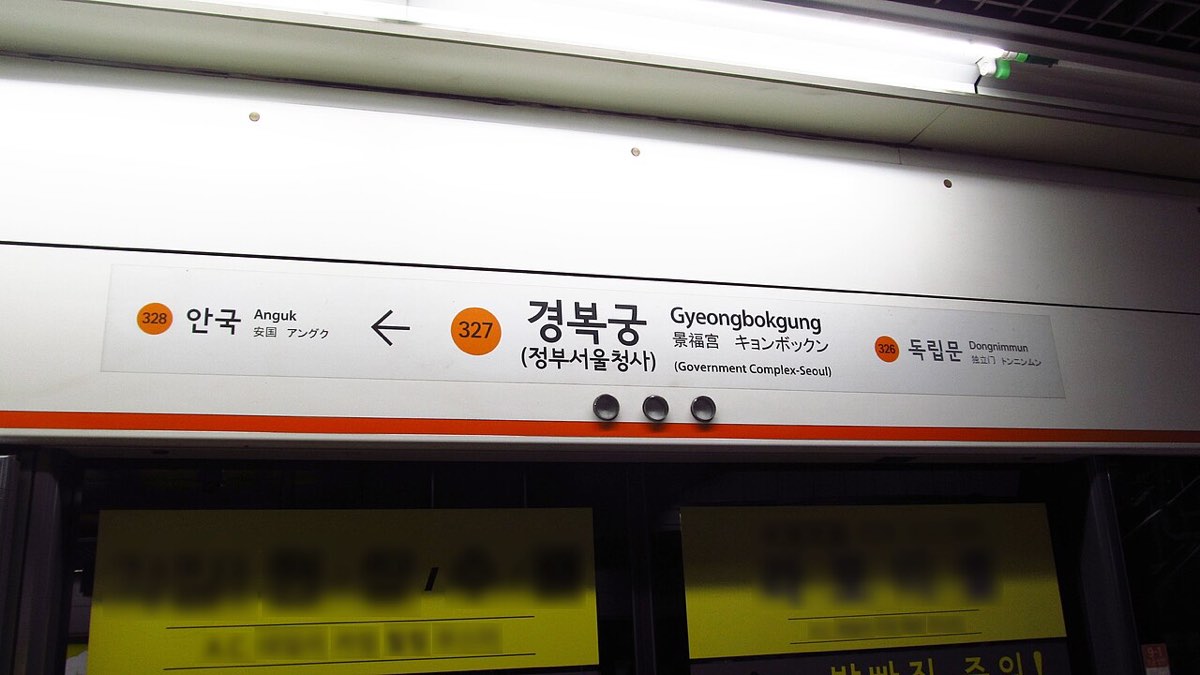
A transit result reads top to bottom like a script. It tells you which station and exit to walk to, which line to board and in which direction, how many stops to ride, where to change and which exit to leave by. Directions on the platform are shown by station names rather than compass points, so note the name of the next stop or the end of the line before you go down. Naver adds the door position for the quickest transfer, which is worth following at large interchange stations.
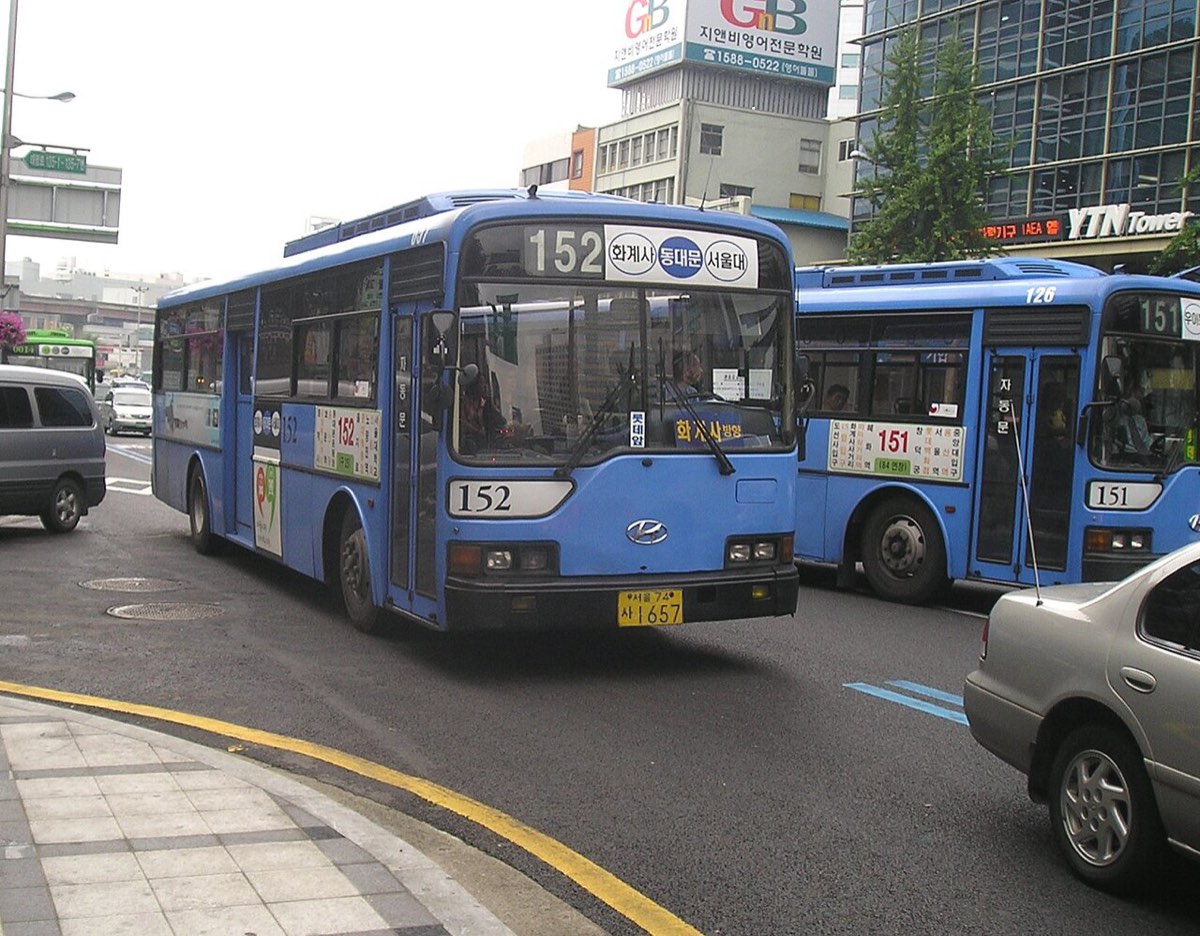
Bus legs show a route number and a color. In Seoul, blue marks trunk routes, green marks branch and small village routes, yellow marks downtown circular routes and red marks express routes to the suburbs, and late-night routes carry an N before the number. Tap the bus leg to see the arrival estimate and the full list of stops. Then check the name of the next stop, because stops for opposite directions usually face each other across the road under the same name.
Walking legs deserve a glance too. Seoul's main roads are wide, and pedestrian crossings on them can be far apart, so a walking leg that looks short on the map may include a detour to a crossing or a dip through an underground passage. If the walking time seems long for the distance, that is usually why. Following the app's line rather than the route your eyes suggest normally gets you there sooner and keeps you off the median.
A quick test before you rely on any result: compare the app's final step with the venue's own directions. Changdeokgung's palace office lists Anguk Station (Line 3) Exit 3 and a five-minute walk. Search 창덕궁, tap Directions, choose public transport and look at the last line of each option. If a route ends at Anguk Station Exit 3, it matches the official guidance, and you can tap Start and let the get-off alert do the rest.
Saving places so the day plan travels with you
Searching and getting directions work without signing in, but saving places requires an account with Naver or Kakao. If you build lists, do it at home on Wi-Fi: save your accommodation, each palace or museum, and a couple of fallback restaurants near each, so the map shows the whole day at a glance. A shared list link is also the easiest way to coordinate with companions, and it survives a dead phone if someone else in the group has it open.
Do not let the list replace the official page. Map apps show opening hours, but palace and museum hours shift with the season, and holiday openings and closures are announced as notices on official websites, sometimes only days ahead. Use the app to get there and the venue's own site to confirm that it is open, then save that official page next to the place in your list.
When the signal or the battery gives out
Treat both apps as online tools. Route search, live bus times and translation need data, so arrange an eSIM, a local SIM or pocket Wi-Fi before you land, and carry a battery pack on long days. As insurance, screenshot the day's key route cards and the Hangul addresses. That is enough to finish a journey, ask a passer-by for help or show a taxi driver where you are going, even with no connection at all.
If you are truly stuck, the 1330 Korea Travel Hotline runs around the clock; from a foreign phone, dial +82-2-1330. It provides tourist information and interpretation, and Visit Korea also offers it as a free online call over Wi-Fi and through chat on KakaoTalk, LINE and WhatsApp. Reading out the nearest station name and exit number is the fastest way to describe where you are, which is one more reason to notice exit numbers as you walk.
Questions visitors ask
Will Google Maps have walking directions in Korea by 2027?
Possibly, but nothing is confirmed. Korea approved Google's map-data export with conditions in February 2026, and in August 2026 Google said it plans full navigation in Korea without naming a date. Check the app before you travel, and install Naver Map regardless.
Can I search Naver Map in English at all?
Yes. Major sights usually appear under their English names, and Naver translates business names, addresses, categories and hours into English. Small restaurants, shops and alleys are where English searches fail, so switch to the Hangul name when the result list looks wrong.
How do I type Hangul if I don't have a Korean keyboard?
Copy and paste. Take the Hangul from this guide, a venue's official site or a message, and paste it into the search bar. If you expect to search often, add the Korean keyboard in your phone's language settings; it is free and takes about a minute.
The app says to board toward a station I've never heard of. Is that wrong?
No. Platforms are labeled by station names, usually the next station or the end of the line, not by north or south. Match the name in the app to the sign on the platform, and check the line color before you board.
Which app should I use for buses?
Either works in Seoul. Both show route numbers, stop lists and arrival estimates. Whichever you use, confirm the name of the next stop so you board on the correct side of the road.
Sources and method
Written for: Independent visitors who rely on their phone to find palaces, museums, stations and bus stops in Seoul and want to stop getting lost at the last few hundred meters.
Method: Researched from the official sources listed below, checked on October 20, 2026. App features and Google's Korea rollout can change; the linked official pages are the final word. Spotted something out of date? Tell us.
- The Korea Times: Korea conditionally approves Google request to export map data (February 27, 2026)Approval on February 27, 2026 by the interagency body; earlier rejections in 2007 and 2016; conditions on domestic servers via local partners, government review before export, a local responsible officer, erased military sites and removed coordinates.
- The Korea Herald: Google builds Korea team for full-functioning Maps service (August 25, 2026)Current Google Maps capabilities in Korea (places, reviews, transit; no turn-by-turn; dotted walking legs); Google's stated plan with no launch date.
- NAVER Corp. press release: multilingual review translation in NAVER Maps (October 2, 2024)Four supported languages, OS or in-app language setting, Papago translation of names, addresses, categories, hours and reviews.
- NAVER Corp. press release: NAVER Map launches public transit guidance (December 11, 2023)Boarding and get-off alerts, route bar, stops remaining, train door position for quick transfers, station exit numbers, and train selection for iOS users.
- Apple App Store: KakaoMap listingLanguages listed as English and Korean.
- Royal Palaces and Tombs (Korea Heritage Service): DirectionsOfficial road-name addresses and station exits for the palaces and Jongmyo used in the table and examples.
- National Institute of Korean Language: Romanization of KoreanRomanization based on standard pronunciation; vowel and consonant spellings used in the search table.
- Seoul Metropolitan Government: BusSeoul bus color system (blue trunk, green branch and local, yellow circulation, red rapid) and Owl buses.
- VisitKorea: 1330 Korea Travel Helpline1330 and +82-2-1330 numbers, tourist information and interpretation, free online call, chat via KakaoTalk, LINE and WhatsApp.
- Seoul Metropolitan Government: English homepage contact footerKorea Travel Hotline listed as 24/7.